

Does Amazon Take EBT? Yes, But It’s a Bit Messy (Read This)
Amazon provides EBT (Electronics Benefits Transfer) recipients the opportunity to buy eligible items on their platform. However, with the nearly endless products sold on Amazon, it can be difficult to know which items are EBT eligible, and which are not. Not to mention an Amazon Prime membership, and other additional services, it can be tricky to know if and when you can use EBT towards those purchases. Below you’ll learn exactly what products are EBT eligible on Amazon’s platform and how to add your EBT card to Amazon to start using your benefits.
So…Does Amazon Take EBT?
Yes.
Amazon has accepted EBT for many years now, but since they’ve traditionally been online only, and now have some brick & mortar and other services, it gets a little more tricky.
How Does Amazon EBT Work?
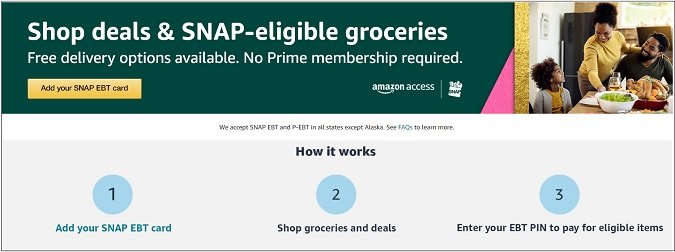
To use your SNAP EBT card on Amazon, follow these three simple steps:
1. Add/register your SNAP EBT card number on Amazon’s website here.
2. Shop for your groceries.
3. Once done shopping, enter your EBT PIN to pay for all eligible grocery items selected on Amazon.
You can still buy non-eligible EBT items, you just have to use a separate form of payment.
See Also: 4 Clever Ways to Buy Amazon Returns and Save
How Do I Add My EBT Card To My Account?
Before you can start using your SNAP EBT benefits on Amazon, inevitably you must enter your EBT card’s unique number.
To add your SNAP EBT card, register your EBT card number here on Amazon’s website.
What Are the Product Exclusions?
The food that is currently eligible for SNAP EBT on Amazon includes:
- Fruits, vegetables, meat, poultry, fish, and dairy products.
- Bread, cereals, canned vegetables, and pantry items.
- Snacks, seeds, and non-alcoholic beverages.
When in doubt, be on the lookout for Amazon grocery items labeled with “SNAP EBT eligible”.
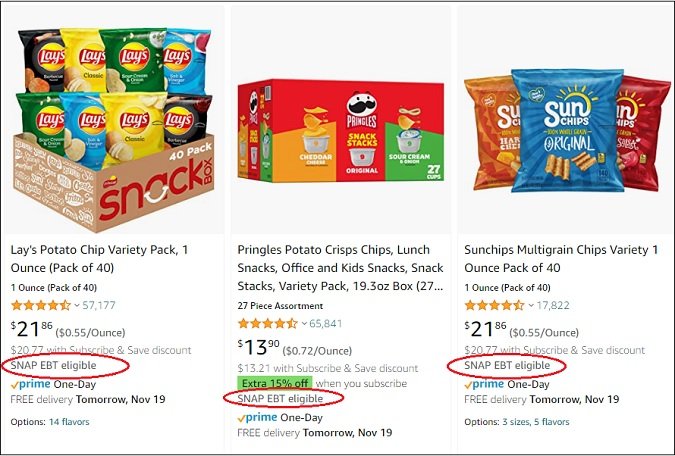
Otherwise, if products aren’t listed above, or at the very least, have a “SNAP EBT eligible” label, the product is ineligible and excluded from EBT.
Some notable ineligible product exclusions that you can’t buy with EBT on Amazon include:
- Alcohol
- Tobacco products
- Medicine
- Dietary Supplements
- Live animals
- Cleaning supplies, beauty products, and pet food.
Amazon doesn’t actually sell alcohol or tobacco products, but I’ll include them in my list for the sake of clarity.
Also, it’s worth noting that you cannot use Amazon Layaway in conjunction with EBT eligible items.
See Also: You Can Also Use EBT at Costco…Here’s How
Does Amazon EBT Work In All 50 States?
Almost.
Amazon EBT works in all states except Alaska.
You can also use EBT in Guam, Puerto Rico, Virgin Islands, and the District of Columbia.
Do I Have To Be An Amazon Prime Member to Use EBT?
No.
You don’t need an Amazon Prime membership in order to use EBT benefits for Amazon items.
This means you also have access to Amazon Fresh and Whole Foods Market without being a Prime member.
Likewise, on SNAP EBT-eligible orders, you can get free delivery without needing a Prime membership.
How Does Amazon Verify My EBT Status?
Amazon verifies your EBT status by requiring you to enter your EBT number.
You must qualify again each year to ensure your EBT status has not changed.
With regards to verifying EBT status to get a 50% discount off an Amazon Prime membership for EBT recipients, you must do the following:
1. Enter your EBT number.
2. Upload an image of your EBT card.
See Also: Can You Also Use EBT at Whole Foods Market?
Can Items Be Sold by a 3rd Party Seller?
No.
For items to EBT eligible, they MUST be shipped by Amazon and sold by Amazon.
Items sold by 3rd party sellers are not eligible.
Can I Buy Amazon Gift Cards With EBT?
No.
Unfortunately, you cannot buy Amazon gift cards with EBT.
Can I Buy My Annual Amazon Prime Membership with EBT?
No.
You can’t buy your annual Amazon Prime membership with EBT.
However, you can receive a 50% discount from Amazon Prime with proof of being an EBT recipient.
To verify you are a valid EBT recipient to receive this Prime discount, you must 1) enter your EBT number here and 2) upload an image of your EBT card.
Is the Return Policy The Same When Using EBT?
Yes.
If you aren’t satisfied with your Amazon Fresh store item or Amazon Go item, you can return it to receive a refund if you paid using EBT.
To return your Amazon Fresh or Amazon Go item for a refund you paid with EBT:
1. Visit “Your Orders” (on your Amazon account).
2. Navigate to the item you wish to return (that was bought using EBT)
3. Select “Request Item Refund”.
4. Follow the additional directions provided.
It’s important to note it can take up to 10 business days for the refund to be issued back onto your EBT card once the refund has been processed.
Ask the Reader: Do you regularly use your EBT benefits on Amazon? If so, am I missing any tidbits of information that others might find helpful?

By Kyle James
Leave a Reply
You must be logged in to post a comment.